

Instead of manually scrolling Discord for recruiting advice every day, use a Discord quant community to interview workflow that turns useful discussions into verified leads, stronger applications, and targeted practice. For your 2026 search, connect each conversation to a specific role and a next action—not another collection of saved messages.
- The Discord quant community to interview workflow starts with verified roles, not unsolicited referral requests.
- Use Discord for technical discussion and peer practice; verify recruiting information through the employer.
- QuantMinds quant career coaching suits candidates seeking individual resume feedback and interview preparation.
- Track evidence, permission to follow up, application status, and technical weaknesses—not message volume.
Why this matters
A useful technical conversation is not an application, and a referral is not an interview. Your workflow needs separate checkpoints for learning, demonstrating ability, contacting people, and submitting materials.
Discord gives you a place to discuss problems and meet peers. It does not establish whether someone represents an employer or whether recruiting advice applies to your target role. Treat community information as a lead to investigate, not an instruction to follow blindly.
QuantMinds quant career coaching is best for candidates who need individual feedback on resumes and interview preparation. QuantMinds provides resume review, interview prep, and 1-on-1 coaching; that support complements community participation rather than replacing technical work or employer applications.
Before you start
- Access and rules: Use your own Discord account, read the server rules, and confirm where introductions, technical questions, recruiting discussions, and private outreach belong. You do not need moderator permissions or a bot for this workflow.
- Application materials: Prepare a current resume, a short introduction, a project you can explain, and a private document or spreadsheet. Remove personal contact information before sharing materials publicly.
- The gotcha: Server membership does not verify employment, and permission to post does not imply permission to message members privately. Never share assessment content, confidential research, login credentials, or identity documents in a community conversation.
Choose a manual workflow first. Automation adds little value until you know which discussions deserve action, and you should not build a process around scraping member information or sending unsolicited messages.
Your 2026 role filter
Start with the work you want to do, not the busiest server. Quantitative research, trading, and development require different evidence; use the actual role description to decide which discussions and practice exercises matter.
The table below is a planning guide, not a universal hiring rubric. A firm's description takes priority over a community member's interpretation.
| Target track | Best for | Community activity | Useful evidence | Main limitation |
|---|---|---|---|---|
| Quantitative research | Candidates targeting modeling and empirical research | Discuss assumptions, validation, and research design | A reproducible project with defensible methods | An interesting result alone does not establish sound research |
| Quantitative trading | Candidates targeting trading decisions and uncertainty | Explain probability reasoning and decision trade-offs | Clear reasoning, calculations, and error analysis | Memorized answers do not show how you handle unfamiliar problems |
| Quantitative development | Candidates targeting software and research infrastructure | Review code, algorithms, testing, and implementation choices | Readable code with tests and a technical explanation | Completing a coding exercise does not establish fit for every development role |
Pick one primary track for this workflow. Keep adjacent roles in a separate list so advice for a different hiring process does not quietly take over your preparation.
Configure your community intake
- Choose your scope. Write down your primary track, experience level, location constraints, and work authorization requirements. Use these criteria to reject irrelevant leads before spending time on them.
- Read before contributing. Find the server's rules and designated channels. Check whether recruiting posts, resume reviews, and direct messages are permitted; follow the local process rather than assuming every community works alike.
- Search for relevant discussions. Use Discord's search to find your role terminology and technical topics. Search for a specific concept, such as regression diagnostics or algorithm complexity, rather than relying only on broad quant discussions.
- Save context, not fragments. Where available, use Copy Message Link on a useful message. Record why it matters, whether the author identifies a source, and what you need to verify outside Discord.
- Separate advice from leads. Mark a discussion as a learning topic, a possible employer lead, or a potential peer connection. Do not treat all three as applications in progress.
Expected result: You have a short queue of relevant discussions with a clear reason to revisit each one. A message without a role connection or next action stays out of the queue.
Configure your evidence log
Use a private tracker rather than your memory. The field names below are labels you create yourself, not Discord settings.
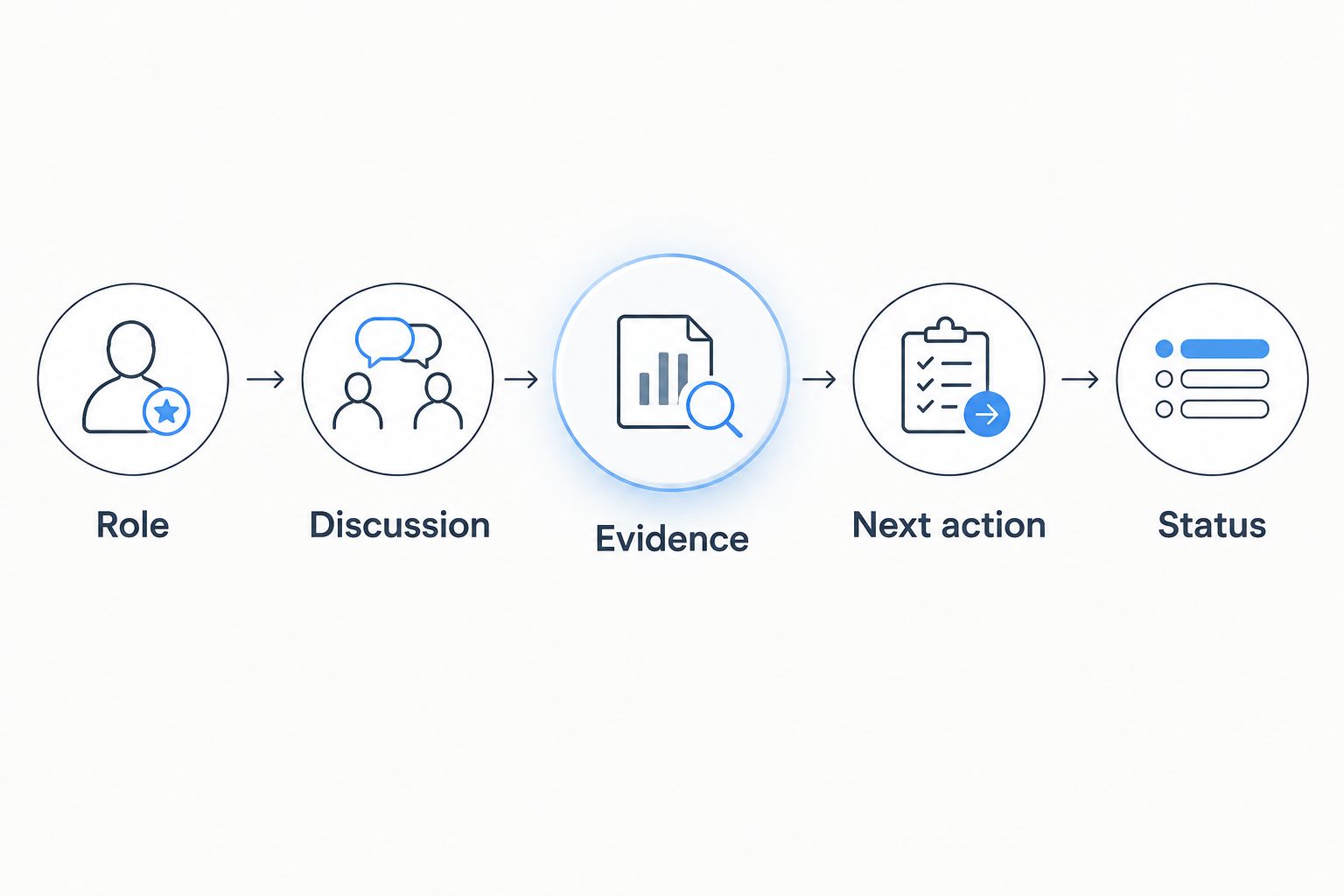
- Create the fields. Add columns named Role, Discussion, Source, Evidence, Next action, Permission, and Status. Record only information needed for your own recruiting process.
- Write an evidence gap. For each useful discussion, identify what you cannot yet demonstrate. Examples include explaining a validation choice, defending a runtime estimate, or solving a conditional probability problem without prompts.
- Produce something reviewable. Write a solution, revise a project explanation, or improve a code sample before asking for feedback. Show assumptions and the point where your reasoning becomes uncertain.
- Run a short explanation test. As a practice target, explain the work aloud for 2 minutes without reading it. Note where you skip a justification or rely on terminology you cannot define.
- Request bounded feedback. Ask about a specific decision or error. A focused question gives another person something concrete to assess; a request to review your entire background does not.
Expected result: Each selected discussion produces either a demonstrated skill or a named weakness. Saving another resource is not completion.
For project discussions, separate what you built from what you can defend. The guide to explaining a research project in a quant interview helps turn that distinction into preparation rather than a polished but fragile pitch.
Configure permission-based outreach
- Contribute in context. Answer a question you understand, share a reasoned correction, or explain your attempted solution. Do not manufacture expertise to attract attention.
- Ask before moving privately. Follow server rules and ask whether a member is comfortable continuing the discussion by direct message. If the answer is no—or there is no answer—leave the conversation there.
- Make a bounded request. Explain the shared discussion, the relevant part of your background, and the question you want answered. Do not attach a resume or request a referral without context.
- Verify recruiting claims. Check the employer's own recruiting materials before submitting information. If someone claims to recruit for a firm, confirm their identity through an independently located official channel.
- Record the agreement. Note what the person agreed to do and any timing they supplied. A helpful technical reply is not permission to describe someone as your referral.
Expected result: You have a consensual conversation with a defined next step—or a clean stopping point. Neither outcome requires repeated messages.
A message structure you can adapt:
We discussed validation choices in the research channel. I revised my project explanation to separate model selection from evaluation. Would you be comfortable answering a specific question about how I describe that distinction?
This is a writing template, not a testimonial or a script to send unchanged. Use your actual work and the real discussion.
Configure your 2026 application-to-practice handoff
- Verify the role. Confirm the employer, role description, application route, and stated eligibility requirements. Use the employer's current instructions rather than an old screenshot or a forwarded deadline.
- Map requirements to evidence. Match each relevant requirement to a resume bullet, project detail, or experience you can explain. Mark gaps honestly instead of adding keywords you cannot support.
- Submit through the instructed route. Follow the employer's process. If a contact offered a referral, ask how to coordinate it; do not submit repeatedly under different routes without clarification.
- Create a practice queue. Turn weaknesses from community discussions into exercises. Keep coding, mathematical reasoning, research explanation, and behavioral preparation distinguishable so progress in one does not hide neglect elsewhere.
- Rehearse under interruption. As a suggested exercise, run a 20-minute peer session in which the listener asks follow-up questions. Finish with 5 minutes of feedback on reasoning, clarity, and unsupported claims.
- Update the tracker. Record the application outcome, the practice weakness, and the next corrective action. Do not copy confidential assessment questions into Discord or your shared practice materials.
Expected result: Every submitted application has a corresponding preparation plan. You know what to practice next without returning to the server for another generic checklist.
QuantMinds interview prep and resume review address those application and preparation tasks. Coaching supplies individual feedback; you still need to complete the exercises and substantiate every claim in your materials.
When a Discord discussion is updated
Use a second workflow when an existing thread receives a correction, a new technical explanation, or updated recruiting information. Recheck the changed claim, not the entire conversation.
- Open the saved discussion and identify what changed.
- Check the original source again if the update concerns eligibility, timing, or an application route.
- Revise your evidence or next action only when the update affects your target role.
- If a member invited an update, reply with what you changed and a focused follow-up question.
- Close the item when no further action is needed.
For your 2026 tracker, distinguish an updated message from verified new information. Repetition inside a community does not make an unsupported recruiting claim authoritative.
This variant is useful for ongoing peer review, too. Return with a revised solution and explain the correction instead of restarting the same request for help.
Troubleshooting
Your introduction gets no response
Replace the broad request with a question attached to visible work. Check the channel rules first, then ask in the appropriate place; do not repost the same introduction across channels or message members in bulk.
Advice conflicts across members
Compare the role, seniority, and evidence behind each answer. For application requirements, use the employer's instructions; for technical disagreements, reproduce the reasoning or test the claim rather than counting reactions.
A member offers a referral immediately
Verify identity and ask what the process involves before sending documents. Do not provide account access or sensitive identity information through a Discord conversation, and never describe an unconfirmed offer as an employer endorsement.
You solve problems but struggle aloud
Stop increasing problem volume temporarily. Rework a familiar problem while explaining assumptions, alternatives, and checks; ask your practice partner to interrupt whenever a step lacks justification.
Community activity replaces applications
Review your tracker for completed evidence, verified applications, and practice actions. If the only growing category is saved discussions, reduce browsing and finish an existing item before adding another.
Customize your workflow
Build around your bottleneck. If your resume does not show the work you can do, prioritize evidence and application materials; if you receive interviews but cannot explain your reasoning, prioritize practice and feedback.
QuantMinds offers resume review, interview prep, and 1-on-1 coaching for professionals and students targeting quantitative research, trading, and development roles. That is individual support, not a substitute for employer-specific preparation or a promise of an interview.
For the rest of your 2026 search, keep Discord in a defined role: a source of discussion, peer feedback, and potential connections. Your application process and technical preparation remain separate responsibilities.
FAQ
How do I go from a Discord quant community to an interview?
Use community discussions to identify relevant skills and possible leads, then verify roles and submit through the employer's process. Build evidence, ask permission before private outreach, and prepare for the specific role; community participation does not guarantee an interview.
Should I ask Discord members for referrals immediately?
Do not make an unsolicited referral request your opening message. Establish relevant context, follow server rules, and ask whether the person is comfortable discussing your application.
Do I need a Discord bot for quant recruiting?
You do not need a bot for this workflow. Discord search, saved message links, and a private tracker are enough to organize discussions and next actions without collecting member data.
How do I know whether a Discord recruiter is genuine?
Verify the person's identity through an independently located official employer channel. A username, server role, or recruiting claim is not sufficient verification.
Can I share quant interview questions with my practice group?
Use original practice problems or material you have permission to share. Do not post confidential assessments, restricted interview content, or another candidate's private materials.
Is Discord enough for quant interview preparation?
Discord is not a complete preparation plan. Pair community discussion with independent problem solving, role-specific technical practice, project explanations, and feedback on how you communicate.
What should I track after a useful community conversation?
Track the target role, source, evidence gap, next action, outreach permission, and status. Avoid storing unrelated personal information about community members.
One last thing
Practice correcting yourself publicly without defending the original mistake. Post the revised reasoning, identify the assumption that failed, and explain how you checked the correction. That exercise gives you something more useful than a polished introduction: a concrete example of receiving feedback and improving your work.